![]() Google Buzz Team
Replies: 26
Google Buzz Team
Replies: 26
AutoShare from YouTube to Buzz
If you use YouTube a lot, you may be familiar with AutoShare (see http://help.youtube.com/support/youtube/bin/answer.py?hl=en&answer=157215) which you can use to automatically share your favorites, likes, uploads, or comments on videos to Facebook. Twitter, and Google Reader. Now you can choose to automatically share from YouTube to Google Buzz as well.
You can still keep YouTube as a connected site in Buzz if you hooked it up previously, but that only automatically posts your uploads for now.
![]()
If you use YouTube a lot, you may be familiar with AutoShare (see http://help.youtube.com/support/youtube/bin/answer.py?hl=en&answer=157215) which you can use to automatically share your favorites, likes, uploads, or comments on videos to Facebook. Twitter, and Google Reader. Now you can choose to automatically share from YouTube to Google Buzz as well.
You can still keep YouTube as a connected site in Buzz if you hooked it up previously, but that only automatically posts your uploads for now.
![]() Google Buzz Team
Replies: 62
Google Buzz Team
Replies: 62
Google Buzz API talks and hackathons
Come join us to talk about how you can build on Google Buzz -- check out the list below to see if weÍll be in a city near you. We'll cover several open standards (Activity Streams, OAuth, PubSubHubbub, and Salmon) and go in depth with the Google Buzz API and libraries. In some locations weÍll have extended time for hacking with Googlers on hand to answer your questions.
HereÍs the schedule (weÍll add links for the Cambridge, Kiev, and Moscow sessions soon):
Sydney, Australia - July 1: http://code.google.com/events/devfests/2010/sydney4.html
Manila, Philippines - July 6: http://code.google.com/events/devfests/2010/asia1.html
Singapore - July 9: http://code.google.com/events/devfests/2010/asia2.html
Kuala Lumpur, Malaysia - July 16: http://code.google.com/events/devfests/2010/asia3.html
New York, NY, USA - July 21: http://www.meetup.com/NYC-GTUG/calendar/13899003/
Cambridge, MA, USA - August 7
Stockholm, Sweden - July 12: extra gtug mte juli
Berlin, Germany - July 15: http://www.berlin-gtug.org/2010/06/july-2010-berlin-gtug-meeting.html
Kiev, Ukraine - July 17
Moscow, Russia - July 19
Lisbon, Portugal - July 28th: https://spreadsheets.google.com/a/google.com/viewform?formkey=dFd5aFo3WVVUX2xaeUZOVDJJVlo1ekE6MQ
Come join us to talk about how you can build on Google Buzz -- check out the list below to see if weÍll be in a city near you. We'll cover several open standards (Activity Streams, OAuth, PubSubHubbub, and Salmon) and go in depth with the Google Buzz API and libraries. In some locations weÍll have extended time for hacking with Googlers on hand to answer your questions.
HereÍs the schedule (weÍll add links for the Cambridge, Kiev, and Moscow sessions soon):
Sydney, Australia - July 1: http://code.google.com/events/devfests/2010/sydney4.html
Manila, Philippines - July 6: http://code.google.com/events/devfests/2010/asia1.html
Singapore - July 9: http://code.google.com/events/devfests/2010/asia2.html
Kuala Lumpur, Malaysia - July 16: http://code.google.com/events/devfests/2010/asia3.html
New York, NY, USA - July 21: http://www.meetup.com/NYC-GTUG/calendar/13899003/
Cambridge, MA, USA - August 7
Stockholm, Sweden - July 12: extra gtug mte juli
Berlin, Germany - July 15: http://www.berlin-gtug.org/2010/06/july-2010-berlin-gtug-meeting.html
Kiev, Ukraine - July 17
Moscow, Russia - July 19
Lisbon, Portugal - July 28th: https://spreadsheets.google.com/a/google.com/viewform?formkey=dFd5aFo3WVVUX2xaeUZOVDJJVlo1ekE6MQ
![]() Google Buzz Team
Replies: 87
Google Buzz Team
Replies: 87
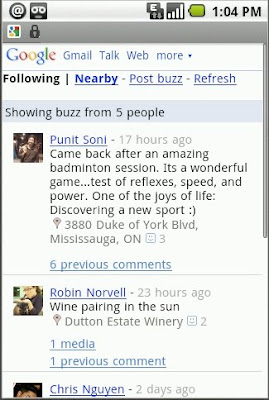
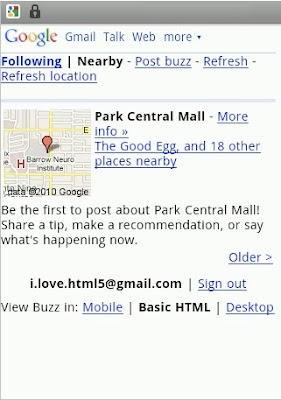
When Google Buzz launched, it was only available for devices running Android 2.0+ and iPhone. Not any more! Today weÍre a releasing an XHTML version of the Buzz website which can be accessed from many other mobile devices, including those running Android pre-2.0, Blackberry, Nokia S60, and Windows Mobile.
Read more at http://googlemobile.blogspot.com/2010/05/google-buzz-for-mobile-now-available-on.html
![]()
![]()
![]()
Read more at http://googlemobile.blogspot.com/2010/05/google-buzz-for-mobile-now-available-on.html
![]() Google Buzz Team
Replies: 96
Google Buzz Team
Replies: 96
New! Comments and likes tabs on your profile
Many of you have asked for an easy way to refer back to the posts you've commented on and/or liked. Some of you have also requested a way to see what other people have commented on or liked -- a great way to discover posts that may interest you too.
Starting today, you'll see new tabs on your profile that show all the posts you've commented on or liked. By default, these tabs are only visible to you. If you want to share your comments and likes tabs, you can choose to make them publicly visible to others from the Buzz tab under Settings. This won't change who can see each post; private posts stay private.
![]()
Many of you have asked for an easy way to refer back to the posts you've commented on and/or liked. Some of you have also requested a way to see what other people have commented on or liked -- a great way to discover posts that may interest you too.
Starting today, you'll see new tabs on your profile that show all the posts you've commented on or liked. By default, these tabs are only visible to you. If you want to share your comments and likes tabs, you can choose to make them publicly visible to others from the Buzz tab under Settings. This won't change who can see each post; private posts stay private.

![]() Google Buzz Team
Replies: 187
Google Buzz Team
Replies: 187
Fighting follower spam
Any web service that involves following has to fight "follower spam" -- accounts that follow lots and lots of people in the hopes that some of them will click through to their profiles and a few might even end up buying whatever it is they're selling. Buzz is no different. If you're getting following notices from Buzz users with names that sound suspiciously like spammy marketing scams, the chances are that's exactly what they are -- and we're after them. Just like we work hard to protect your Gmail accounts from email spam, we're working to protect Buzz from follower spam. We look at lots of factors when determining whether to disable an account for follower spam including the number of people it attempts to follow and whether people are blocking it. And just as we're constantly tweaking the algorithms which detect Gmail spam, the same goes for follower spam in Buzz.
If you're followed by any suspicious looking users, you can report them by clicking the "Report this profile" link on their profile. If they aren't really suspicious but you just don't want them following you, you can always block them.
Any web service that involves following has to fight "follower spam" -- accounts that follow lots and lots of people in the hopes that some of them will click through to their profiles and a few might even end up buying whatever it is they're selling. Buzz is no different. If you're getting following notices from Buzz users with names that sound suspiciously like spammy marketing scams, the chances are that's exactly what they are -- and we're after them. Just like we work hard to protect your Gmail accounts from email spam, we're working to protect Buzz from follower spam. We look at lots of factors when determining whether to disable an account for follower spam including the number of people it attempts to follow and whether people are blocking it. And just as we're constantly tweaking the algorithms which detect Gmail spam, the same goes for follower spam in Buzz.
If you're followed by any suspicious looking users, you can report them by clicking the "Report this profile" link on their profile. If they aren't really suspicious but you just don't want them following you, you can always block them.
![]() Google Buzz Team
Replies: 31
Google Buzz Team
Replies: 31
New Google Buzz API features
We just launched the Google Buzz firehose (our top developer feature request) which makes all public activities available as they are published, along with new feeds including comments, likes, and shared counts.
Read more on the Code Blog:
http://googlecode.blogspot.com/2010/07/new-google-buzz-api-features-including.html
![]()
We just launched the Google Buzz firehose (our top developer feature request) which makes all public activities available as they are published, along with new feeds including comments, likes, and shared counts.
Read more on the Code Blog:
http://googlecode.blogspot.com/2010/07/new-google-buzz-api-features-including.html
![]() Google Buzz Team
Replies: 45
Google Buzz Team
Replies: 45
Two quick Buzz for mobile updates
Yesterday we rolled out a new design for rendering location attached to posts, including a better place icon, a bigger map, and an easy way to get directions from the post itself.
In addition, you can now disable comments from Buzz for mobile. (Look for this option under "More Actions").
![]()
Yesterday we rolled out a new design for rendering location attached to posts, including a better place icon, a bigger map, and an easy way to get directions from the post itself.
In addition, you can now disable comments from Buzz for mobile. (Look for this option under "More Actions").

![]() Google Buzz Team
Replies: 89
Google Buzz Team
Replies: 89
Read about the updates we're making to the Google Buzz API (http://googlecode.blogspot.com/2010/05/introducing-google-buzz-api.html) and check out some of the initial apps developers have created so far (http://www.google.com/buzz/apps)!
![]()
![]()

![]() Google Buzz Team
Replies: 61
Google Buzz Team
Replies: 61
If you started using Google Buzz before we changed the start-up experience from auto-following to suggestions for people to follow, we want to help you ensure that Buzz is set up the way you want. So the next time you click into the Buzz tab you'll see a page asking you to confirm your Buzz settings -- you can review and edit your settings from here, or at anytime from the Buzz tab of Gmail Settings.
For more info, check out this post on the Gmail blog: http://gmailblog.blogspot.com/2010/04/confirm-your-buzz-settings.html
![]()
![]()
For more info, check out this post on the Gmail blog: http://gmailblog.blogspot.com/2010/04/confirm-your-buzz-settings.html

![]() Google Buzz Team
Replies: 495
Google Buzz Team
Replies: 495
Hey all -- this is the account for the Google Buzz team. We'll post all sorts of updates here about what we're working on. Feel free to give us feedback and ideas on Google Buzz!
Here's a photo of our launch "war room" from last week. :-)
![]()
Here's a photo of our launch "war room" from last week. :-)

![]() Google Buzz Team
Replies: 52
Google Buzz Team
Replies: 52
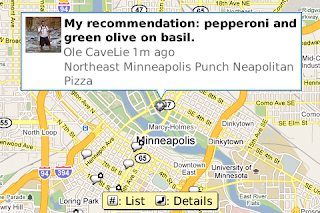
The Buzz layer in Google Maps for mobile is now available on BlackBerry phones:
http://googlemobile.blogspot.com/2010/04/google-maps-40-for-blackberry-adds.html
![]()
![]()
http://googlemobile.blogspot.com/2010/04/google-maps-40-for-blackberry-adds.html
![]() Google Buzz Team
Replies: 81
Google Buzz Team
Replies: 81
New! View entire photo albums in Buzz
Tired of only being able to view a handful of photos from a given Flickr or Picasa album in Buzz's photo viewer? Now you can view the entire thing.
@Thomas Hawk -- we thought you'd appreciate this ;)
Tired of only being able to view a handful of photos from a given Flickr or Picasa album in Buzz's photo viewer? Now you can view the entire thing.
@Thomas Hawk -- we thought you'd appreciate this ;)
![]() Google Buzz Team
Replies: 59
Google Buzz Team
Replies: 59
Need a refresher on how to post by email? Want an easy way to show your mom how to share privately? Check out the 7 tips videos we just added to the Google Buzz YouTube Channel.
Following: http://www.youtube.com/watch?v=MFo2WvPPgfE
Comments & likes: http://www.youtube.com/watch?v=3H0or0Tnrt8
Photos, links & videos: http://www.youtube.com/watch?v=sDZAPBy-ups
Connect sites: http://www.youtube.com/watch?v=2G9ZRBGWQc4
Public/private posting: http://www.youtube.com/watch?v=-IZyk9ECvb8
@replies: http://www.youtube.com/watch?v=9LS7MsuHLMI
Post via email: http://www.youtube.com/watch?v=JGjj4IGSGQw
![]()
Following: http://www.youtube.com/watch?v=MFo2WvPPgfE
Comments & likes: http://www.youtube.com/watch?v=3H0or0Tnrt8
Photos, links & videos: http://www.youtube.com/watch?v=sDZAPBy-ups
Connect sites: http://www.youtube.com/watch?v=2G9ZRBGWQc4
Public/private posting: http://www.youtube.com/watch?v=-IZyk9ECvb8
@replies: http://www.youtube.com/watch?v=9LS7MsuHLMI
Post via email: http://www.youtube.com/watch?v=JGjj4IGSGQw
![]() Google Buzz Team
Replies: 52
Google Buzz Team
Replies: 52
Reshare from your mobile device
For the last month or so, you've been able to reshare interesting buzz posts from your computer (see http://gmailblog.blogspot.com/2010/05/reshare-in-google-buzz.html for more info).
Today, we're excited to announce that we've enabled this feature for buzz.google.com on Android and iPhone as well. (If you don't see it right away, try clearing your cache/cookies.)
![]()
For the last month or so, you've been able to reshare interesting buzz posts from your computer (see http://gmailblog.blogspot.com/2010/05/reshare-in-google-buzz.html for more info).
Today, we're excited to announce that we've enabled this feature for buzz.google.com on Android and iPhone as well. (If you don't see it right away, try clearing your cache/cookies.)

![]() Google Buzz Team
Replies: 101
Google Buzz Team
Replies: 101
In San Francisco or Toronto? Come chat with the Buzz for mobile team and other Buzz users.
Google Buzz can be a great place to have a conversation, but we all know face-to-face interactions are still invaluable. Many of you have suggested in person meet ups to mingle and chat with other people using Google Buzz, so we're having our first meet ups focused on Buzz for mobile next week in San Francisco and Toronto. Join @Punit Soni and @Robin Norvell from the Buzz for mobile team as well as other users for what promises to be an interesting discussion.
San Francisco meet up
Tuesday, June 22nd 6pm
Axis Cafe
1201 8th Street
San Francisco, CA 94107
Toronto meet up*
Tuesday, June 29th 7pm
linuxcaffe
326 Harbord Street
Toronto, ON M6G 1H3
* Updated with new Toronto location
Google Buzz can be a great place to have a conversation, but we all know face-to-face interactions are still invaluable. Many of you have suggested in person meet ups to mingle and chat with other people using Google Buzz, so we're having our first meet ups focused on Buzz for mobile next week in San Francisco and Toronto. Join @Punit Soni and @Robin Norvell from the Buzz for mobile team as well as other users for what promises to be an interesting discussion.
San Francisco meet up
Tuesday, June 22nd 6pm
Axis Cafe
1201 8th Street
San Francisco, CA 94107
Toronto meet up*
Tuesday, June 29th 7pm
linuxcaffe
326 Harbord Street
Toronto, ON M6G 1H3
* Updated with new Toronto location
![]() Google Buzz Team
Replies: 62
Google Buzz Team
Replies: 62
Two quick Google Buzz for mobile updates
Today we released two new features for buzz.google.com on your phone.
Address auto-complete for @replies: Just type @ and the first few letters of the person's name and you'll be prompted with email addresses to choose from. Less typing on tiny mobile keyboards = good ;) You may notice that the first time you do this it seems a little slow to load, but it should get faster after that.
Full rendering of Google Reader shared items: You'll now see more details from blogs/Reader shared items right in the post.
Try these out and let us know what you think in the comments.
![]()
Today we released two new features for buzz.google.com on your phone.
Address auto-complete for @replies: Just type @ and the first few letters of the person's name and you'll be prompted with email addresses to choose from. Less typing on tiny mobile keyboards = good ;) You may notice that the first time you do this it seems a little slow to load, but it should get faster after that.
Full rendering of Google Reader shared items: You'll now see more details from blogs/Reader shared items right in the post.
Try these out and let us know what you think in the comments.

![]() Google Buzz Team
Replies: 14
Google Buzz Team
Replies: 14
In case you missed it, videos of the Google I/O talks are now all live: http://code.google.com/events/io/2010/sessions.html
And for those of you interested in learning more about how to use the Buzz APIs, here's @Chris Chabot's talk:
Google I/O 2010 - What's the hubbub about Google Buzz APIs?
Thanks @Google I/O 2010!
![]()
![]()
And for those of you interested in learning more about how to use the Buzz APIs, here's @Chris Chabot's talk:
Google I/O 2010 - What's the hubbub about Google Buzz APIs?
Thanks @Google I/O 2010!
![]() Google Buzz Team
Replies: 26
Google Buzz Team
Replies: 26
Nice Google Maps previews in Google Buzz
Now when you paste a Google Maps link into the post box, Buzz will automatically fetch a preview of the location you can associate with your post. More info here: http://gmailblog.blogspot.com/2010/06/google-maps-previews-in-gmail-and.html
![]()
![]()
Now when you paste a Google Maps link into the post box, Buzz will automatically fetch a preview of the location you can associate with your post. More info here: http://gmailblog.blogspot.com/2010/06/google-maps-previews-in-gmail-and.html

![]() Google Buzz Team
Replies: 205
Google Buzz Team
Replies: 205
Reshare - coming out today!
When you find an interesting buzz post you want to reshare, instead of copying and pasting it (and maybe attributing the original poster with an @reply along the way), you'll now be able to reshare posts with two clicks. If you don't see the "Reshare" link quite yet, hang tight. It should be on for everyone by the end of the day.
Learn more at: http://gmailblog.blogspot.com/2010/05/reshare-in-google-buzz.html
![]()
![]()
![]()
![]()
When you find an interesting buzz post you want to reshare, instead of copying and pasting it (and maybe attributing the original poster with an @reply along the way), you'll now be able to reshare posts with two clicks. If you don't see the "Reshare" link quite yet, hang tight. It should be on for everyone by the end of the day.
Learn more at: http://gmailblog.blogspot.com/2010/05/reshare-in-google-buzz.html


![]() Google Buzz Team
Replies: 100
Google Buzz Team
Replies: 100
Tweets with location now showing with Buzz on the map
If you've added Twitter as a connected site in Google Buzz and your tweets have a location (via Twitter or other services), they'll now appear in the mobile buzz.google.com "Nearby" view and on the Buzz layer in Google Maps (both mobile and desktop). Check out one of these views to see buzz posts, tweets and more around you.
![]()
If you've added Twitter as a connected site in Google Buzz and your tweets have a location (via Twitter or other services), they'll now appear in the mobile buzz.google.com "Nearby" view and on the Buzz layer in Google Maps (both mobile and desktop). Check out one of these views to see buzz posts, tweets and more around you.
